Suppose a revised dealer price sheet arrives while your team is still processing orders at the old rate. Updating the number is only one part of the job. The team also needs to know which price group changes, which product and unit the rate covers, and which quotes or orders still need a decision.
Before taking the next online order, agree the intended rate and test it with the affected dealer account. Keep the old and new prices together in a change record so sales, operations and finance can see what changed without reconstructing it from messages.
Separate a new rate from a different product or pack
Match the revised sheet to a product code, variant and ordering unit before comparing prices. A bottle rate and a carton rate are not a price increase on the same item. Neither is a replacement model with a similar name.
For each proposed change, record the old rate, proposed rate and the source of the revision. If the unit or pack quantity differs, resolve that identity question before applying the change. Keep the product code, variant, pack and ordering unit together in the change record below so the identity decision stays beside the proposed rate.
Confirm which dealers share the affected commercial terms. A rate approved for one group is not permission to change every dealer in the region. HyperInventory supports assigned dealer catalogue and pricing and differential buyer-group prices; the commercial decision about which group receives a revision remains yours.
Keep quantity, unit and price basis the same
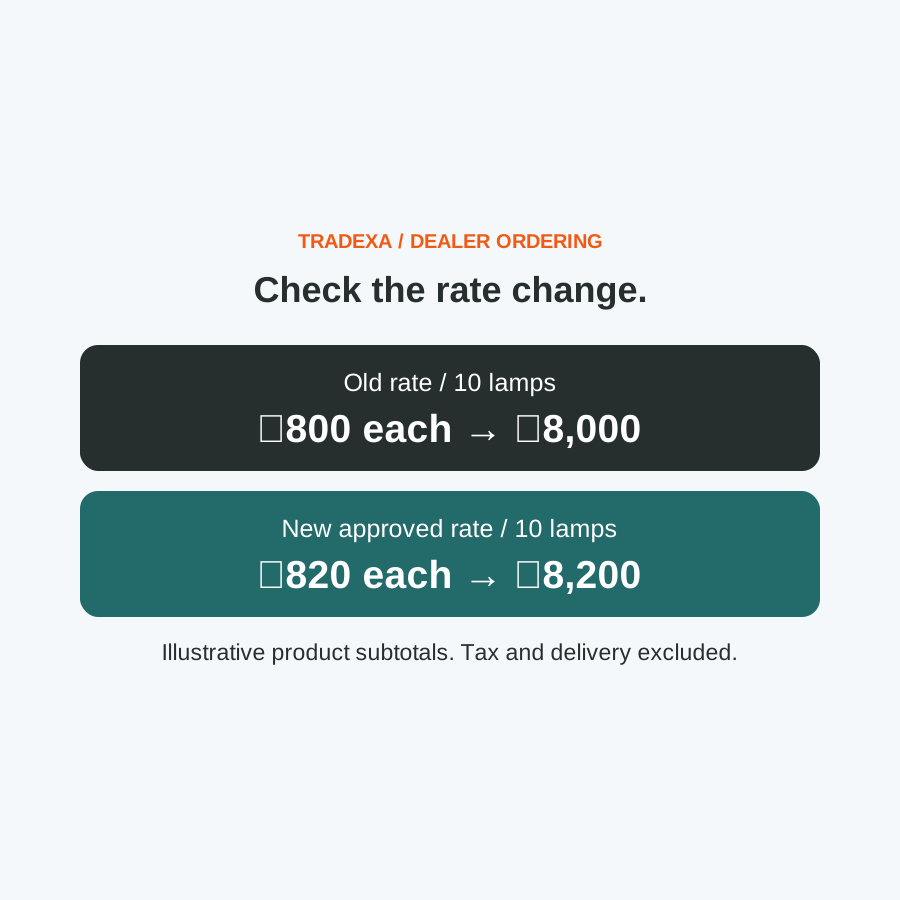
Consider an illustrative change for a boxed desk lamp. One approved dealer group currently pays ₹800 per lamp, and the proposed new rate is ₹820. For the same ten lamps, the product subtotal moves from ₹8,000 to ₹8,200: a ₹200 difference before tax and delivery.
Use that same product and quantity for the check. Comparing an old ten-unit order with a new carton order would hide whether the rate itself changed correctly. If another dealer group should remain at ₹760 per lamp, its ten-lamp product subtotal should still be ₹7,600 in this example.
Ask sales and finance to confirm the basis of the proposed rate: tax treatment, delivery charges and any agreed offer or quotation. The example does not establish discount precedence or an import format. Check those against your supported workflow and approved commercial terms.
Decide what happens to work already in progress
List the quotes, saved carts and orders that might be affected before changing a live price. Record their stage and the price already communicated or confirmed. Do not assume a catalogue change updates every stage in the same way.
For a draft or unconfirmed order, decide who checks the rate before confirmation. For a confirmed order or invoice, inspect the recorded price and agree how any requested change will be handled through the appropriate commercial and accounting process. A new catalogue rate is not evidence that an earlier transaction has changed.
Keep these as separate decisions. This guide does not promise automatic repricing of old quotes, carts or orders, and it does not prescribe changing a customer's agreed terms. Ask to see how your implementation handles each stage before relying on it.
Copy this dealer price-change record
Use one record for each product and affected price group. It should explain both the new rate and the work that still needs attention.
- Product code, variant, pack and ordering unit: ______
- Affected dealer price group: ______; approval owner: ______
- Old rate and price basis: ______
- Approved new rate and price basis: ______; source/date: ______
- Intended start of new-rate use: ______; person applying the change: ______
- Test product quantity: ______; expected old/new product subtotals: ______
- Existing quote/cart/order references needing a decision: ______
- Stage, recorded price and agreed action for each reference: ______
- Dealer-side displayed rate and received new-order rate: ______
- Unaffected group checked: ______; expected rate: ______
- Difference found: ______; correction owner: ______; next check: ______
- Release decision: ready for new orders / correct and retest
Fill expected values from the approved revision. Record the actual displayed and received values from an authorised test, then close mismatches before applying the change more widely. This is a commercial handover aid, not a universal HyperInventory upload template.
Check the next order and an unaffected group
Use an approved test environment and representative dealer accounts. Check the affected group's product, ordering unit and displayed rate, then compare the same values on the new order your team receives. Include applicable charges in the wider acceptance check, keeping them separate from the product subtotal.
Check an account that should remain unchanged as well. A correct new rate for one group does not prove that other groups kept their approved rates. Where an offer or quotation is involved, follow that supported path rather than assuming every order uses the standard group price.
Keep the change record with the accepted test. If the received order differs from the approved revision, pause the rollout, identify the cause and retest the affected path. Record who handles new orders while the issue is being resolved.
Give the team a clear answer when a dealer asks about the rate
Once the change is checked, give sales and operations the same product, group, new rate and start-of-use information. Keep the relevant pending-order decisions beside it. This makes a price question something the team can trace instead of a fresh search through old messages.
Fewer repeated rate checks may leave more attention for dealer follow-up, availability questions and genuinely negotiated orders. That can support additional order work when price clarification is the constraint, provided someone keeps group assignments and price revisions current. It is not a measured saving or a promise that software removes commercial judgment.
For the broader first-time rollout, use the existing guide to letting dealers check prices and place orders. It covers catalogue access, terms and self-service adoption. This change record covers what the team needs to approve when a rate is revised.
Example note: The lamp prices illustrate a rate-change check, not measured customer results. Replace them with approved product rates, quantities, charges and the supported workflow.